Lens 2026.5.181248-latest - Release#
The new release of Lens Desktop is here.
To ensure a smooth transition and minimize disruption we’ll start by rolling out the update to a small portion of our users, then incrementally increasing this number until all users have access to the update. If you have not received the update and wish to try it out, you can download this version manually at our website .
Enhancements#
-
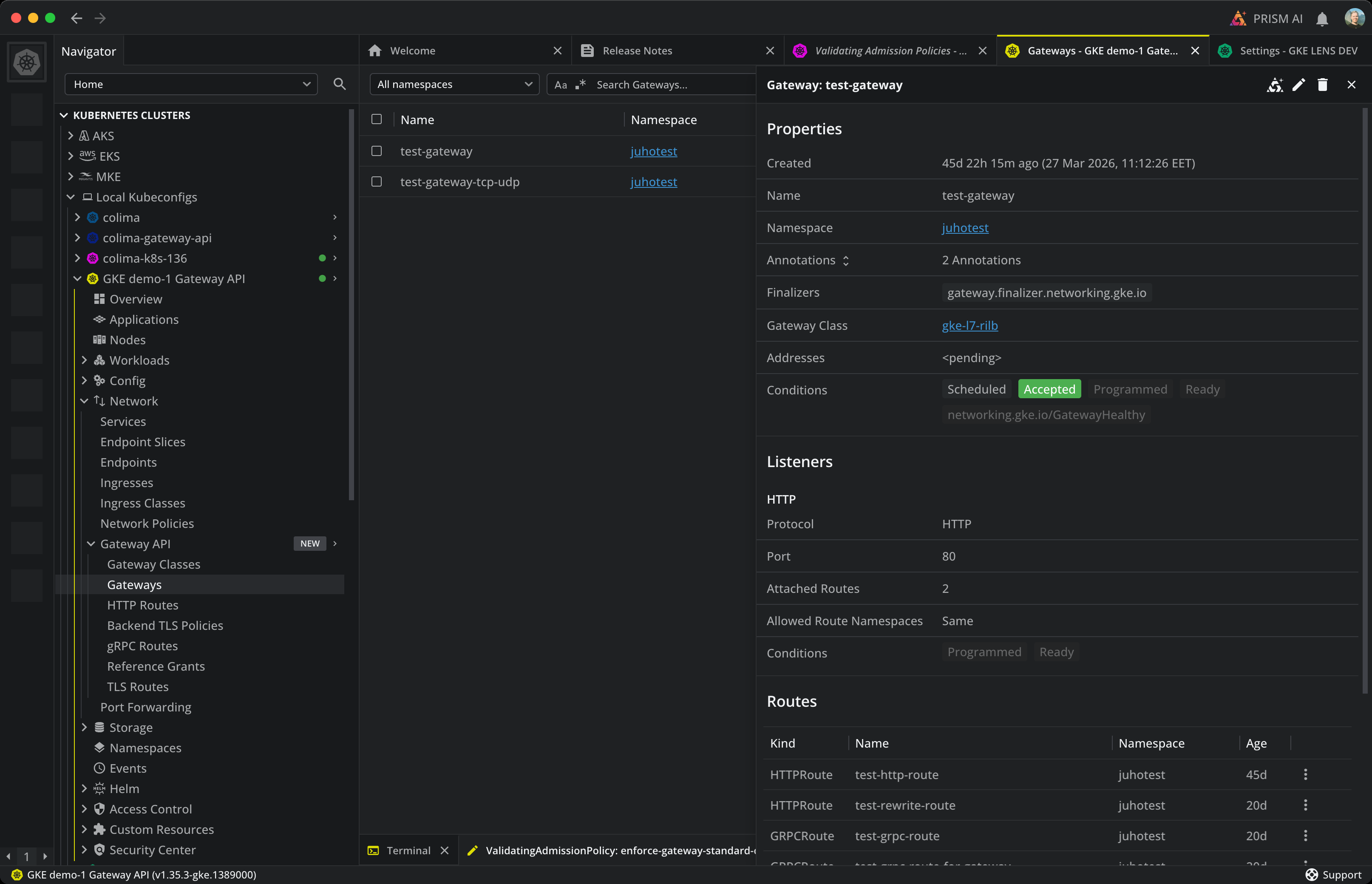
Gateway API support. Browse and inspect Gateway API resources directly in Lens. A new "Gateway API" group appears under the cluster Navigator on clusters that have Gateway API installed, covering Gateway, GatewayClass, HTTPRoute, GRPCRoute, TCPRoute, UDPRoute, TLSRoute, ReferenceGrant, BackendTLSPolicy, and ListenerSet. Detail panels show Properties, Listeners, Attached Routes and conditions, and Services list the Gateway API routes that target them in a unified Routes tab.
-
ValidatingAdmissionPolicy and MutatingAdmissionPolicy support. Browse and inspect admission policies and their bindings directly in Lens. Each resource has its own list view and a detail panel that surfaces Properties, Match Resources, Validations (or Mutations), Variables, and Bindings. CEL expressions render with syntax highlighting that respects your theme, including multi-line expressions. The Admission Policies group only appears on clusters where these resources are available.
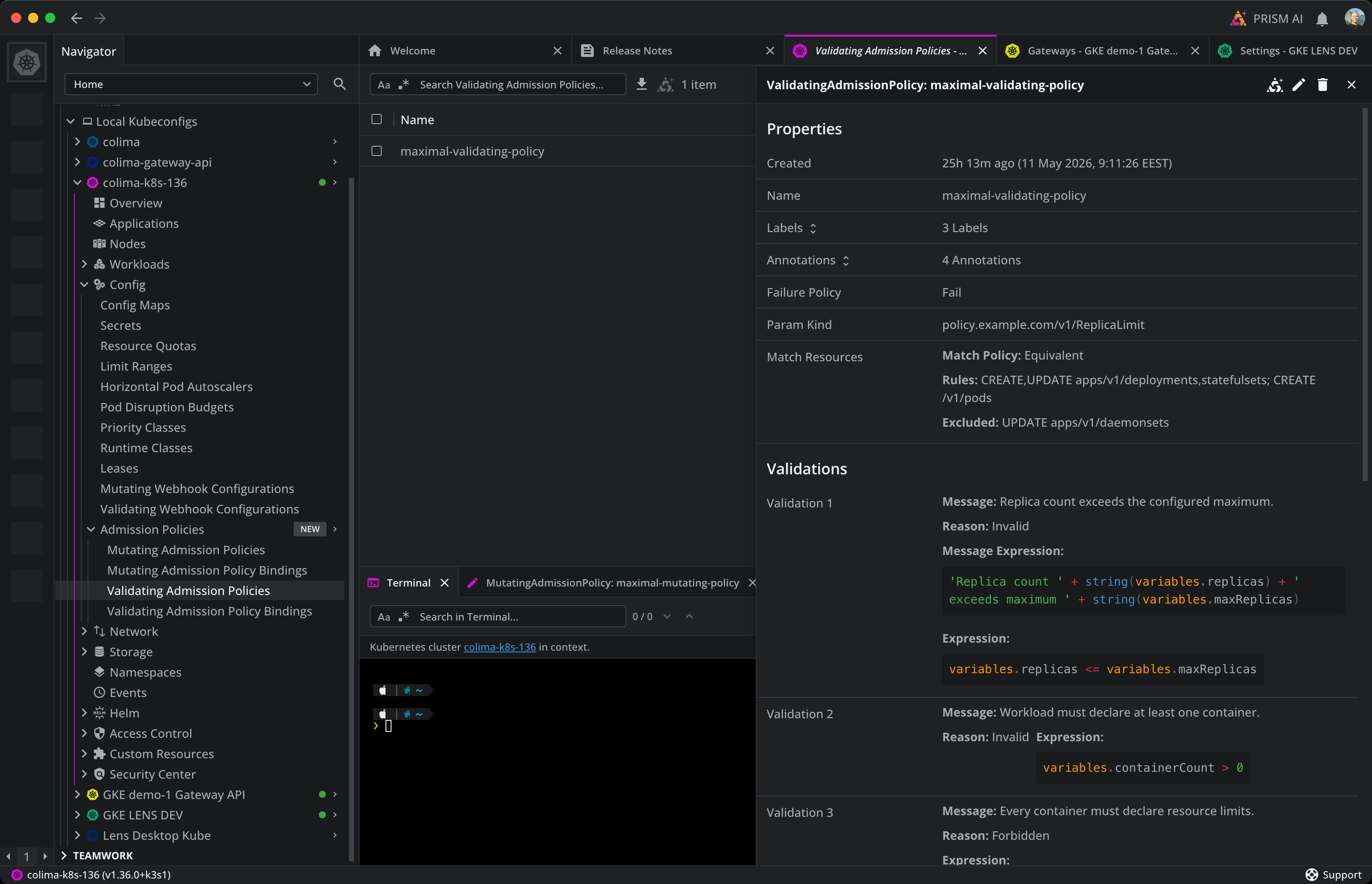
ValidatingAdmissionPolicy detail panel with Properties and CEL-highlighted Validations. -
CEL match conditions on Webhook Configurations. ValidatingWebhookConfiguration and MutatingWebhookConfiguration detail panels now render their
matchConditionsCEL expressions with the same syntax highlighting used in the new Admission Policies views, making it easier to read and audit webhook gating logic.
Bug Fixes#
- Helm chart install no longer crashes after Save. Installing a Helm chart from the Dock no longer triggers a React error boundary after clicking Save. The chart still deployed successfully in earlier versions, but the post-install logs view now renders as expected.
- Helm release Save no longer hangs. Saving changes on a Helm release could hang indefinitely with no notification when the deployed chart version was missing from the cached repo index. Lens now falls back to any active repo that publishes the chart, and surfaces a clear error notification instead of spinning forever if the lookup can't be resolved.
- Helm Releases tab loads with noisy plugins. Helm plugins such as older versions of
helm-secretscould print aWARNING:line to stdout that broke JSON parsing, leaving the Releases and release-history views blank. Lens now tolerates this extra output. - Create ResourceQuota dialog dropdown layout. The "Values" dropdown in the Create ResourceQuota dialog rendered each option with the icon stacked above the label, and the option panel could overflow the dialog footer. Icons and labels are now displayed inline, and the panel respects the dialog bounds.
- AWS EKS cluster discovery: faster and more resilient. EKS clusters are now streamed in per region as they are discovered, instead of waiting on every region before showing anything. A single slow or unreachable region no longer blocks the rest of your clusters from appearing in the navigator.
- HPA Metrics column restored. The Metrics column on the Horizontal Pod Autoscaler list view was missing in recent Lens versions. It is back, showing current/target values per metric.
- Add Secret dialog: rows appear immediately, dialog scrolls internally. Clicking the + button to add an annotation, label, or data field now updates the row list immediately instead of waiting for another re-render. With many fields, the dialog now scrolls internally up to the viewport instead of pushing its header off-screen behind the app scrollbar.
- Events tab populates on every resource detail panel. Clicking the name under "Involved Object" on an Event also correctly opens the referenced resource now.
- Pod log scrolling no longer jumps and flickers. Mouse-wheel scrolling in the log view could cause the view to snap back to the top and flicker rapidly. Scrolling now behaves smoothly, and live-follow mode stays pinned to the bottom reliably.
- AI Provider Type dropdown focus border. In Preferences, the blue focus outline on the AI Provider Type dropdown is no longer interrupted where the menu edge starts.