Gateway API resources#
Kubernetes Gateway API is the successor to Ingress for routing traffic into cluster Services. It uses the API group gateway.networking.k8s.io (stable version v1) and models traffic as a graph of Gateways, route kinds (HTTP, gRPC, and L4 variants), and supporting policies. See Kubernetes Documentation: Gateway API for details.
Lens Desktop displays a Gateway API kind only when the cluster's API server installs the matching CRD.
Channel status (Standard or Experimental) is the source of truth in the channel table below. See the Gateway API release notes for the channel a specific kind belongs to in your cluster's version.
Roles and ownership#
Gateway API divides responsibility across three roles. The role determines which resources you typically own and edit. For example, an Infrastructure Provider can be a cloud provider or a platform team.
| Role | Typical resources owned |
|---|---|
| Infrastructure Provider | GatewayClass |
| Cluster Operator | Gateway, ListenerSet, ReferenceGrant |
| Application Developer | HTTPRoute, GRPCRoute, TCPRoute, UDPRoute, TLSRoute, BackendTLSPolicy |
Standard channel and Experimental channel#
Gateway API publishes kinds in two CRD channels. The Standard channel is GA and included by default. The Experimental channel requires installing the experimental CRDs.
| Channel | Kinds |
|---|---|
| Standard | GatewayClass, Gateway, HTTPRoute, GRPCRoute, ReferenceGrant, BackendTLSPolicy |
| Experimental | TCPRoute, UDPRoute, TLSRoute, ListenerSet |
Where to find Gateway API kinds#
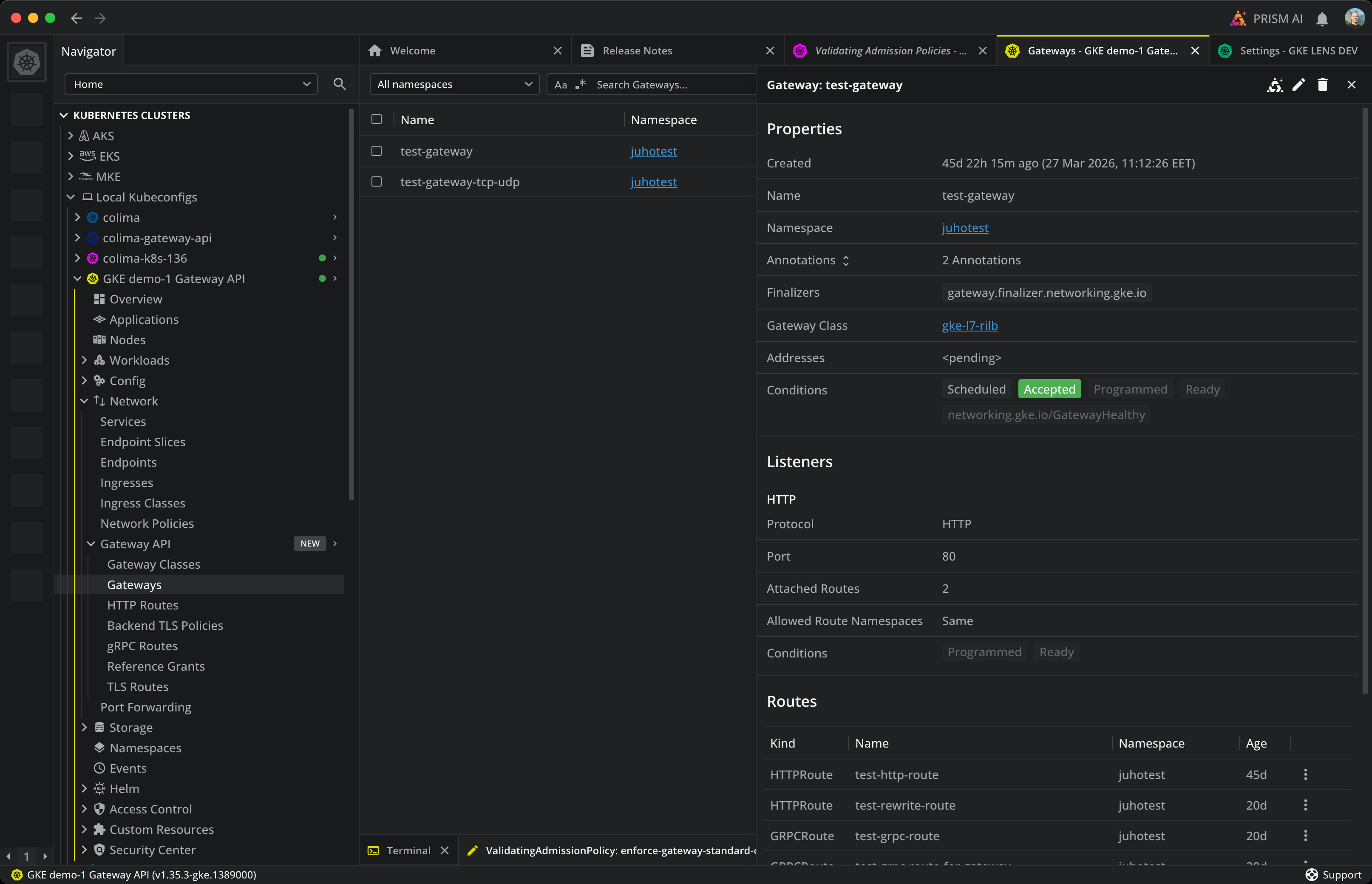
Connect to a cluster and open Gateway API in the Navigator. The group contains:
- Gateways and Gateway Classes
- HTTP Routes, gRPC Routes, TCP Routes, UDP Routes, TLS Routes
- Listener Sets
- Reference Grants
- Backend TLS Policies
Each entry opens a table. The Namespace drop-down filters namespaced kinds. The search field filters by name. You can resize, reorder, sort, and hide columns, and export the table as CSV.
Gateways and classes#
Gateways#
A Gateway binds listeners to addresses and references a GatewayClass that decides which controller handles the traffic. Gateways are namespaced.
The Gateways table shows the following columns:
| Column | Description |
|---|---|
| Name | The Gateway name. |
| Namespace | The namespace the Gateway belongs to. |
| Class | The referenced GatewayClass. Click to open the class. |
| Addresses | The addresses the listeners are bound to, if assigned. |
| Programmed | Whether the controller has configured the underlying infrastructure for this Gateway. |
| Listeners | The number of listeners configured on the Gateway. |
| Age | How long the Gateway has existed. |
Open a Gateway to see two tabs:
- Listeners: per-listener protocol, port, hostname, and TLS configuration.
- Routes: every route currently attached to the Gateway.
Info
The Programmed condition reflects whether the controller has reconciled the Gateway and provisioned the listening infrastructure. A Gateway can be Accepted by the controller without yet being Programmed.
Gateway Classes#
GatewayClass declares a controller that can implement Gateways. Gateway Classes are cluster-scoped.
The Gateway Classes table shows:
| Column | Description |
|---|---|
| Name | The GatewayClass name. |
| Controller | The controller name configured to handle Gateways of this class. |
| Accepted | Whether the controller has accepted the class. |
| Age | How long the GatewayClass has existed. |
Open a class to see its parameters reference and the list of Gateways that use it.
Listener Sets#
ListenerSet lets a Gateway attach a reusable set of listeners. Listener Sets are namespaced and ship in the Experimental channel.
The Listener Sets table shows:
| Column | Description |
|---|---|
| Name | The ListenerSet name. |
| Namespace | The namespace the ListenerSet belongs to. |
| Parent Gateway | The Gateway that consumes the listener set. |
| Listeners | The number of listeners in the set. |
| Attached Routes | The number of routes attached through this set. |
| Age | How long the ListenerSet has existed. |
Routes#
Each route kind binds traffic to backend services for one protocol. All route kinds are namespaced and reference their parent Gateways through parentRefs.
HTTP Routes#
HTTP routes match on hostnames, paths, methods, headers, and query parameters.
| Column | Description |
|---|---|
| Name | The route name. |
| Namespace | The namespace the route belongs to. |
| Hostnames | The hostnames the route matches. |
| Parent Gateways | The Gateways that accept this route. |
| Rules | The number of match rules in the route. |
| Age | How long the route has existed. |
Open an HTTP route to see two tabs:
- Parent Refs lists every Gateway or ListenerSet that accepts the route and shows the attachment status.
- Rules lists matches and backend references for each rule.
gRPC Routes#
gRPC routes match on hostnames and gRPC method names. See HTTP Routes above for the column layout and tabs; the structure is identical.
TCP Routes, UDP Routes, TLS Routes#
These routes carry L4 traffic and share the same columns:
| Column | Description |
|---|---|
| Name | The route name. |
| Namespace | The namespace the route belongs to. |
| Hostnames (TLS only) | The SNI hostnames the route matches. |
| Parent Gateways | The Gateways that accept this route. |
| Age | How long the route has existed. |
Each kind opens a Parent Refs tab and a Backend Refs tab.
Policies and grants#
Backend TLS Policies#
BackendTLSPolicy tells a Gateway to use TLS when connecting to a backend Service. Backend TLS Policies are namespaced.
| Column | Description |
|---|---|
| Name | The policy name. |
| Namespace | The namespace the policy belongs to. |
| Target Services | The Services the policy targets. |
| Validation | The validation mode for the backend certificate. |
| Age | How long the policy has existed. |
Open a policy to see its Target Refs tab and its Validation tab.
Reference Grants#
ReferenceGrant lets a route in one namespace reference a backend in another. Routes only accept cross-namespace backends when a matching ReferenceGrant exists. Reference Grants are namespaced.
| Column | Description |
|---|---|
| Name | The grant name. |
| Namespace | The target namespace where the grant lives. |
| From | The kinds and source namespace the grant is issued to. |
| To | The kinds the grant authorizes access to. |
| Age | How long the grant has existed. |
Routes on a Service#
Open any Service detail panel and select the Routes tab. The tab lists every Gateway API route that targets the Service as a backend, across all route kinds.
| Column | Description |
|---|---|
| Kind | The route kind (HTTPRoute, GRPCRoute, TCPRoute, UDPRoute, or TLSRoute). |
| Name | The route name. Click to open the route. |
| Hostnames | The hostnames the route matches, if any. |
| Parent Gateways | The Gateways that accept the route. |
| Age | How long the route has existed. |
If no routes reference the Service, the tab shows No routes.
See also#
- Services: the resources that Gateway API routes forward traffic to.
- Ingresses: the predecessor API for HTTP routing.
- Endpoint Slices: the endpoints backing a Service.